
RedRevit company • Palette Project product

Palette Project brings Revit content access into one clean palette workflow.

Palette Project is RedRevit’s Revit tool palette plugin. It pairs a fast, dockable frontend Tool Palette with a full backend Palette Editor so teams can browse, search, place, and maintain palette content from one system.

See product features
Frontend Dockable Tool Palette

Search, browse tabs, launch families, and keep content visible inside Revit.

Backend Palette Editor

Author tabs, configure fetch formats, control naming, and curate button content visually.

Palette Editor UI Backend preview
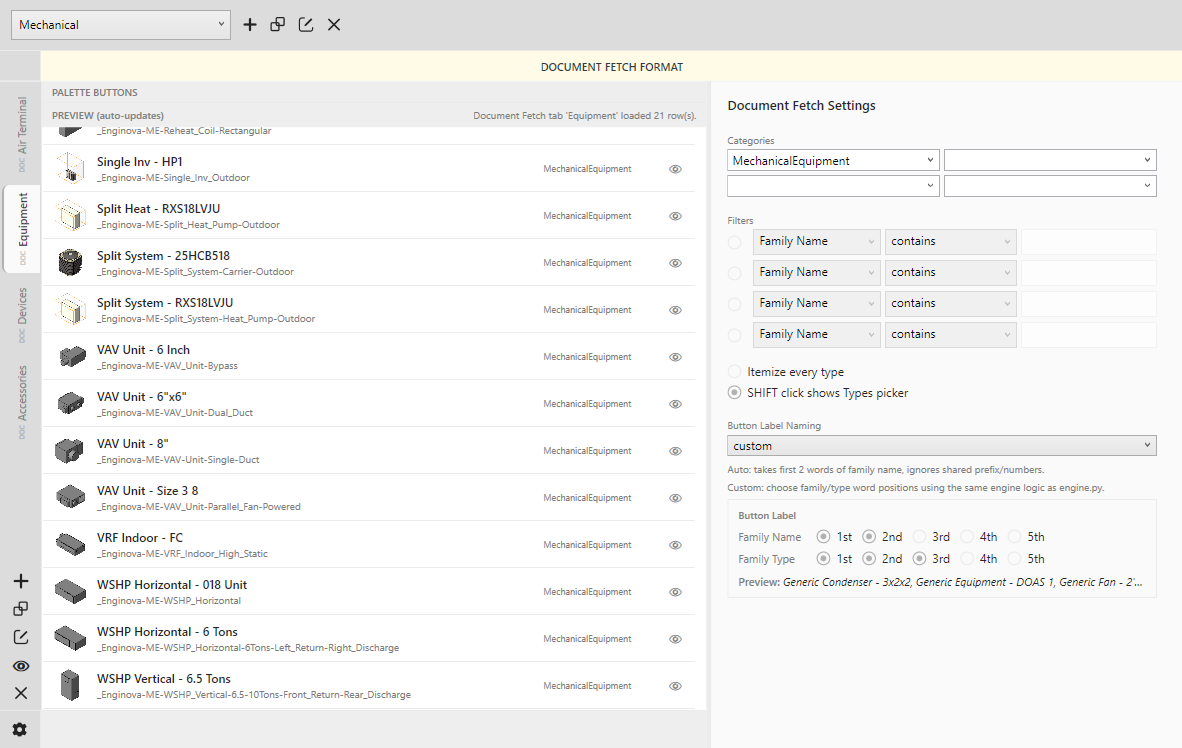
Palette Project editor document fetch view
Tool Palette samples Frontend preview
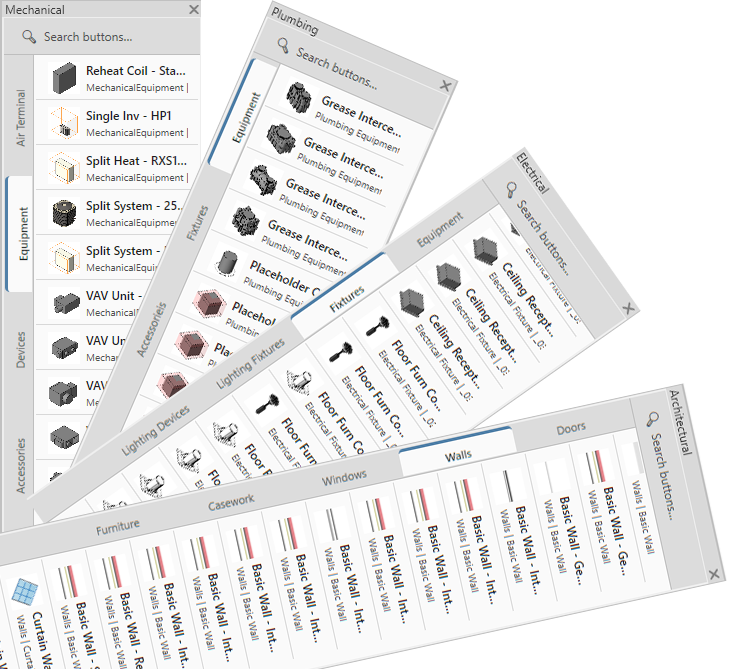
Stacked previews of Architectural, Mechanical, Electrical, and Plumbing tool palettes

Product menu

RedRevit product lineup

PaletteProject Live promo page
QueSync In progress
TidyTransmit In progress

Frontend

Tool Palette samples

The frontend palette is the daily-use surface inside Revit. It keeps categories accessible, makes search immediate, and presents content in a compact vertical layout.

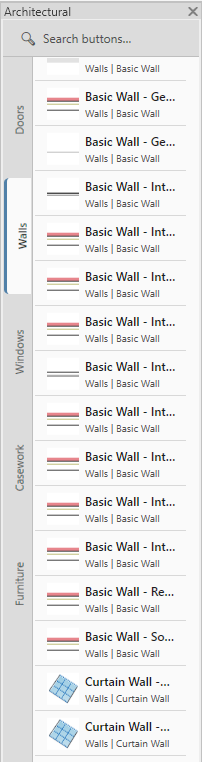
Architectural Long tab sets for walls, doors, windows, casework, and furniture.
Architectural palette sample
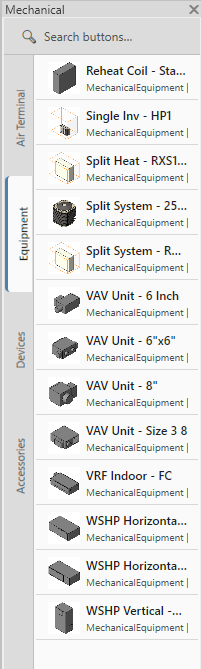
Mechanical Compact system tabs for terminals, equipment, devices, and accessories.
Mechanical palette sample
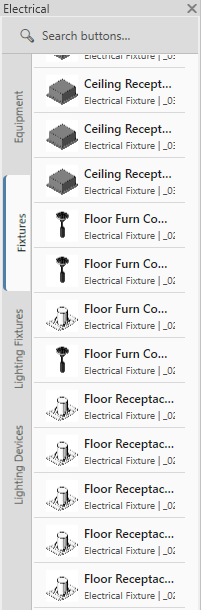
Electrical Search-driven access to fixture-heavy content with repeated family groups.
Electrical palette sample
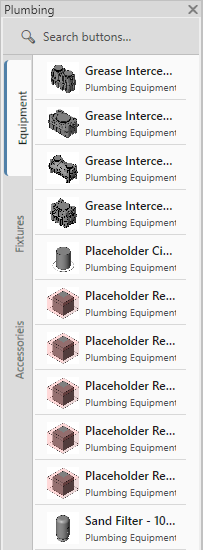
Plumbing Category-focused palette with quick browsing for equipment, fixtures, and accessories.
Plumbing palette sample
Features

Frontend / Tool Palette

Search-first navigation

Top search bar filters visible buttons fast, helping users find families or actions without changing tabs repeatedly.

Vertical tab workflow

Rotated side tabs keep category switching compact while preserving a large scrolling list for actual tool content.

Content-rich rows

Each row can show icon, primary name, category, and family context so the list stays readable even at narrow widths.

Ready for multiple disciplines

Sample palettes already show architectural, mechanical, electrical, and plumbing use cases with consistent UI behavior.
UI + functionality

Frontend specification

Host
Dockable Revit pane built for quick content selection during modeling workflows.
Header
Search field centered at the top of the palette for immediate filtering.
Tabs
Left-aligned vertical tabs with a selected state and a narrow footprint.
Rows
Scrollable button list with icon thumbnail, bold title, and muted metadata line.
Behavior
Single-click launch flow, organized category browsing, and efficient repeated content access.
Visual language
Neutral palette chrome, slim borders, and disciplined hierarchy for compact reading.

Backend

Palette Editor UI samples

The backend editor is where Palette Project gets configured. It supports fetch formats, button previews, naming controls, and category filtering without editing raw files by hand.

Document Fetch format Large preview list, live tab selection, category controls, and filter configuration on the right.
Document Fetch settings in the Palette Editor
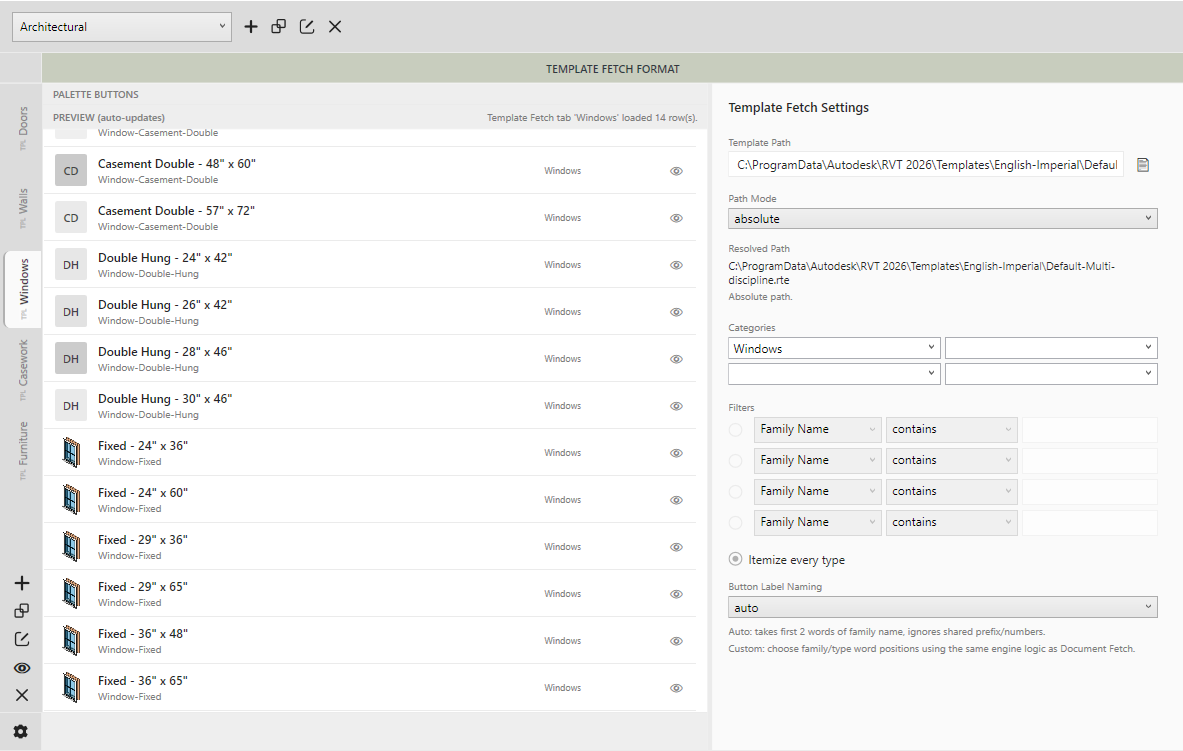
Template Fetch format Template path settings, path mode, resolved path preview, categories, filters, and naming control.
Template Fetch settings in the Palette Editor
Features

Backend / Palette Editor

Format-aware editing

Each palette tab can expose the right controls for Document Fetch, Template Fetch, Folder Fetch, or Custom setups.

Live preview workflow

Preview panels show what a tab will generate, helping authors review labels, categories, and button visibility before publishing.

Filtering and naming rules

Category selectors, filter rows, itemization options, and label naming logic keep large content libraries manageable.

Palette management controls

Top toolbar actions support creating, duplicating, editing, and cleaning up palettes and tabs from one editor workspace.

UI + functionality

Backend specification

Layout
Toolbar at top, tab rail on the left, preview list in the center, and settings panel on the right.
Formats
Supports Custom, Document Fetch, Template Fetch, and Folder Fetch authoring models.
Controls
Palette selector, add/duplicate/edit/remove actions, preview visibility, and settings access.
Settings
Category pickers, filter rows, path fields, naming modes, and hidden item handling.
Preview
Auto-updating preview table helps validate button labels and fetched content before save.
Purpose
Built for maintaining reusable, structured palettes across disciplines and content sources.

Detailed product scope

Functionality and UI specifications

Frontend

Tool Palette specification

Functionality

Search
Quick search narrows visible buttons from the current palette for faster access.
Category tabs
Vertical tabs segment tools into discipline-specific groups without consuming list width.
Family access
Rows present names and context clearly so repetitive content stays distinguishable.
Scroll workflow
Designed for long lists of content that need quick scanning inside a compact docked area.
Consistency
Same interaction model can serve architectural, MEP, and custom team-specific palette structures.

UI spec

Palette shell
Light neutral shell with soft separators and a slim border around the active workspace.
Input area
Single search band at top, aligned with the content list below.
Row hierarchy
Bold line for the main label, smaller muted line for family or category detail.
Tab style
Rotated labels with an active indicator to make section switching obvious.
Icon support
Visual thumbnails help distinguish content even when labels are truncated.
Backend

Palette Editor specification

Functionality

Palette management
Create and organize multiple palettes from a single editing environment.
Format switching
Author tabs with the fetch format that matches the content source and workflow.
Filtering
Use categories and rule rows to narrow generated content for the final palette output.
Naming logic
Control how button labels are generated so lists stay legible and consistent.
Preview validation
Review loaded rows before finalizing the tab configuration.

UI spec

Top toolbar
Palette picker at left with adjacent actions for add, copy, edit, and close flow.
Left rail
Vertical tab list dedicated to the editor’s current palette structure.
Main center
Preview area shows the generated palette button list with icons and categories.
Right panel
Form-based settings panel for fetch inputs, filters, and naming preferences.
Workspace scale
Designed for large desktop editing where preview and settings are both visible at once.

Download

Palette Project download is coming soon

The site is ready to present the product now. The download button is intentionally not wired yet, and can be connected later when the installer or release package is finalized.

Placeholder CTA only.